Node and upgrading a site to the new PR code
First of all, you may be asking, what is Node and why do we need to update the PR code?
Node
Node is the server language that all of our new sites are served under, and old sites will be migrated towards. When you hit Control + F5 on Visual Studio / Web Developer, you're running an ASP.NET server to display the site. When a site is on the node server, you should really be verifying that the site looks right under node rather than ASP.NET.
The vast majority of the time, the site will look the same in ASP.NET as it will in Node, so most of the time it isn't that big of a deal. However, the pr..js file that we will be discussing below will NOT run on ASP.NET. When you try, you will see this error (and a hopefully read the helpful comment telling you to run it in Node instead):

How to run node on your work box
- First install NodeJS
- Visit the NodeJS site
- Click "install" (will download the proper file for your OS)
- Run the file that was just downloaded, will be something like node-v0.10.21-x64.msi
- Then install the dotNode server
- Pull down the Node repository into the same location as your other working directories and leave it there
(svn://svn.atomic8ball.com/node/trunk) - Run "install.bat"
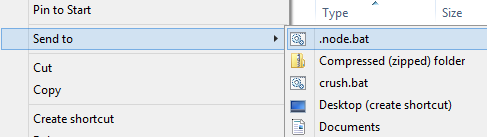
- Now you'll have a context menu entry allowing you to right click a folder and Send to .node.bat
- Pull down the Node repository into the same location as your other working directories and leave it there
pr..js user control
This file, pr..js (yes two periods) replaces the pr.ascx and pr.ascx.cs files and is referenced just like any other user control file, it just has a different name. For example:
<%@ Register Src="/pr..js" TagPrefix="uc" TagName="pr" %>
You reference it on the page exactly the same as before.
<uc:pr Path="/pdf/pr/current/" ItemLimit="3" List="div" Item="" Item_Date="div"
    ListClass="pr" Header="h6" Item_Name="" DateFormat="MMMM yyyy " LinkSymbol="" />
Visual Studio / Web Developer won't recognize the ..js extension, so will complain that the element 'pr' is not a known element. Disregard this error.
If the file starts with 6 numbers followed by a space, then those numbers will be transformed into a date; the numbers must be in the format YYYYMM.
Here are some of the variables that may be applied to the press release user control (case sensitive):
- Path - the path construct to reach the directory to be scanned for press releases
- Sort - defaults to descending, 'asc' will change to ascending
- ItemLimit - the maximum number of entries to display
- List - the HTML structure that will wrap the entire press release object
- Item - the HTML structure that will wrap each individual press release object
- Item_Date - the HTML structure that will wrap the date portion of the press release object
- Item_Name - the HTML structure that will wrap the the <a> link of the file name
- ListClass - the class that will be applied to the List tag, for better styling control
- Header - the header tag that will be used for folders found within the path, typically the year
- HeaderClass - the class that will be applied to the Header tag, for better styling control
- LinkSymbol - adds a symbol to the end of a link, use "" for nothing, if you want » to show up on the end, for example, use " »". This will ensure that the » doesn't appear on a line all by itself.
- SubFolderLimit - limit to the number of subfolders that get parsed from the Path directory
- DateFormat - the format used for how the year is translated
- M - month
- y - year
- for M y, you can use 1 to 4 characters:
- 1 - the number, with no preceding zero
- 2 - the number, with a preceding zero for single digit numbers
- 3 - the word, abbreviated
- 4 - the word, not abbreviated
- For year, only yy and yyyy are valid options
- Additional characters that are not transformed will simply be displayed
e.g. DateFormat="MMMM yyyy -" will transform 201309 into "September 2013 -"